Git
Git is a distributed version control system. In plain words: it tracks file changes so you can review, compare, and roll back safely.
1. What is Git?
Git stores snapshots of your project called commits. Each commit has a unique ID and contains:
- the file state at that point in time
- a commit message
- author + timestamp
- a reference to the previous commit
With that, you can:
- version changes safely
- work in parallel with branches
- collaborate cleanly
- recover quickly from mistakes
2. How does Git work?
Git operates in three areas:
- Working Directory ➡️ your normal project files
- Staging Area (Index) ➡️ where you select changes for the next commit
- Repository (.git) ➡️ where full history is stored
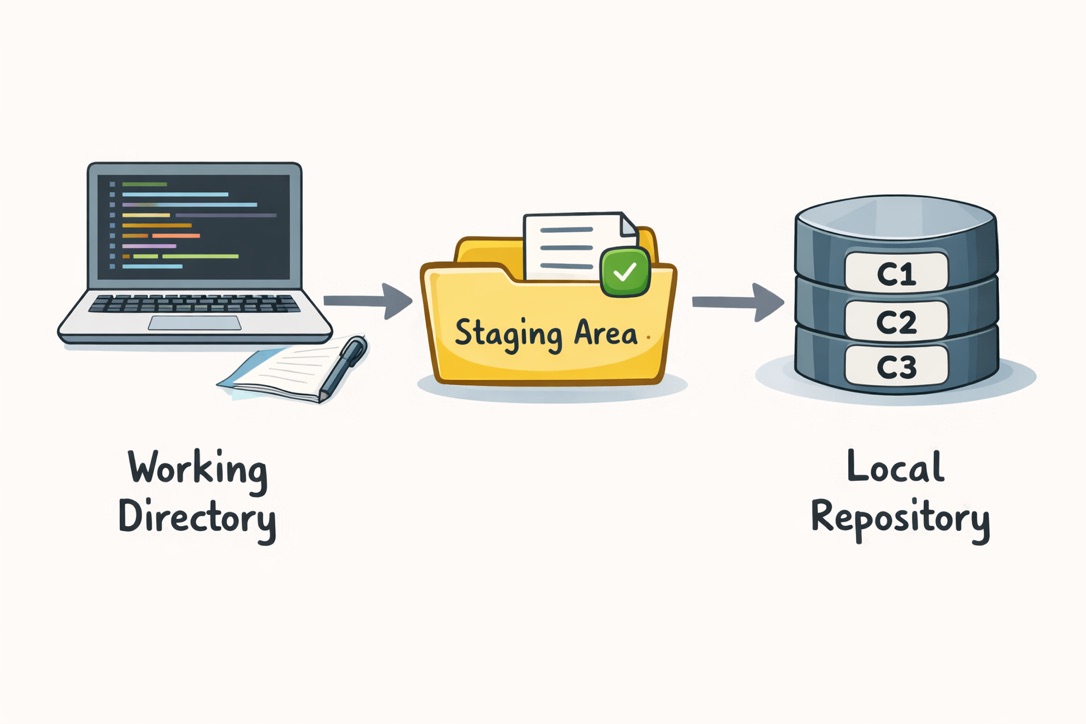
Standard workflow
- Change files
git add(move selected changes to staging)git commit(create a snapshot in history)- optional
git push(send commits to remote like GitHub)
Branch
main: stable main line- feature branch: isolated development for new work
- merge/rebase: integrate work back into
main
3. Most useful Git commands (cheat sheet)
🔧 Setup
Bash
# Set your global Git author name (used in commits)
git config --global user.name "Your Name"

# Set your global Git author email (used in commits)
git config --global user.email "you@example.com"
🔧 Start / get a repository
Bash
# Initialize a new local Git repository in the current directory
git init

# Clone an existing remote repository to your machine
git clone <repo-url>
🔧 Status & history
Bash
# Show current file state: modified, staged, untracked
git status

# Show compact visual commit history with branch/tag pointers
git log --oneline --graph --decorate
🔧 Commit changes
Bash
# Stage one specific file for the next commit
git add <file>

# Stage all changes in the current directory tree
git add .

# Create a commit from staged changes with a message
git commit -m "feat: short, clear message"
🔧 Branches
Bash
# List local branches
git branch

# Create and switch to a new feature branch
git switch -c feature/my-feature

# Switch back to main branch
git switch main
🔧 Add remote repository
Bash
# Add a remote named 'origin' pointing to your repository
git remote add origin <repo-url>

# Verify configured remotes
git remote -v

# Change remote URL (if origin already exists or URL changed)
git remote set-url origin <repo-url>
🔧 Sync with remote
Bash
# Download latest remote references without changing local files
git fetch

# Fetch and integrate remote changes into current branch
git pull

# Push local commits to the configured remote branch
git push

# First push of a branch + set upstream tracking
git push -u origin feature/my-feature
🔧 Compare & rollback
Bash
# Show unstaged changes (working directory vs staging)
git diff

# Show staged changes (staging vs last commit)
git diff --staged

# Discard unstaged changes in one file
git restore <file>

# Create a new commit that safely undoes a previous commit
git revert <commit-hash>
🔧 Hard local reset to remote main (destructive)
Bash
# Update local references from remote 'origin'
git fetch origin

# Force current branch and working tree to exactly match origin/main
git reset --hard origin/main

# Remove all untracked files and folders
git clean -fd
⚠️ Warning: this permanently deletes local uncommitted work and untracked files.
4. How can I undo changes?
Use the right command for the right situation:
Bash
# Undo unstaged changes in one file
git restore <file>

# Unstage a file (keep file content)
git restore --staged <file>

# Undo a commit safely by creating a new opposite commit
git revert <commit-hash>

# Move HEAD one commit back and discard local commit changes (destructive)
git reset --hard HEAD~1

# Remove untracked files/folders (destructive)
git clean -fd
Rule of thumb:
- Shared/public history: prefer git revert
- Local cleanup only: git reset --hard + git clean -fd (with caution)
5. Practical tips (short and important)
- Make small, logical commits (one topic per commit)
- Write clear commit messages (
feat:,fix:,docs:) - Pull/fetch regularly before pushing
- Never commit secrets (
.env, API keys) - Use branches instead of hacking directly on
main
6. References
Cheers!